ScaleRankings vs CTRTool: CTR Tool Features, Proof and Credits
You are weighing two CTR tools and want proof, not promises. ScaleRankings and CTRTool differ most on what you get for each credited visit and how that visit is verified. That difference decides which one fits your search campaigns.
This comparison covers campaign coverage across Google, Bing, Maps and AI Overviews, the proof and reporting each tool provides, and how their credit models work. You will also see a direct feature and pricing breakdown, a clear verdict, and guidance on which tool suits your situation.
Quick Verdict: ScaleRankings vs CTRTool
If you want verified, screenshot-backed CTR campaigns across Google, Bing, Maps and AI Overviews, CTRTool is the stronger choice; if you need broad SEO rank tracking with a built-in SERP simulator, ScaleRankings may fit better. The two tools overlap on surface goals, both touch click-through rate and search visibility, but they solve different problems for different readers.
CTRTool is built around proof of results. Every visit it delivers comes with search and landing screenshots as separate proof images, along with full visit paths. That level of verification is rare in a CTR tool, and it changes how you evaluate a campaign: you are not asked to trust a dashboard number, you can look at the evidence directly.
Campaign scope is another clear split. CTRTool covers Google Search, Bing Search, Maps and AI Overviews, and it tracks keyword positions over time, including Maps listing order and AI citation order. ScaleRankings, by general description, is an SEO software product with rank tracking and SERP preview features. Those are useful capabilities, though they sit closer to monitoring and planning than to verified visit delivery.
Pricing transparency also differs in shape. CTRTool runs a pay-for-results credit model: no credits are charged for technical failures before landing, visits that cannot verify the requested location use no credits, and one credit balance is shared across all campaign types, websites and keywords. ScaleRankings' pricing structure is not something we assert here; readers should confirm current plans directly with the vendor.
On capacity, CTRTool supports up to 100 campaigns with 100 keywords each, visits of up to 5 minutes with up to 5 additional internal pages, and unused credits roll over while subscribed. For teams running title tag testing or meta description optimization alongside click volume goals, that combination of scope and proof is the core differentiator.
Choose CTRTool if you want screenshot-verified visits across multiple platforms and a credit model that only charges for results. Choose ScaleRankings if your priority is a general SEO software suite with rank tracking and a SERP simulator, and verified visit proof is not part of your workflow.
At a glance: how CTRTool compares to ScaleRankings on the features that matter most.
| Feature | CTRTool | ScaleRankings |
|---|---|---|
| Pricing | $59-$699/mo | — |
| Free plan / trial | ✗ | — |
| Screenshot proof per visit | ✓ | — |
| Google Search CTR campaigns | ✓ | — |
| Bing Search CTR campaigns | ✓ | — |
| Google Maps CTR campaigns | ✓ | — |
| AI Overview CTR campaigns | ✓ | — |
| Pay-per-result credit model | ✓ | — |
What Is CTRTool?
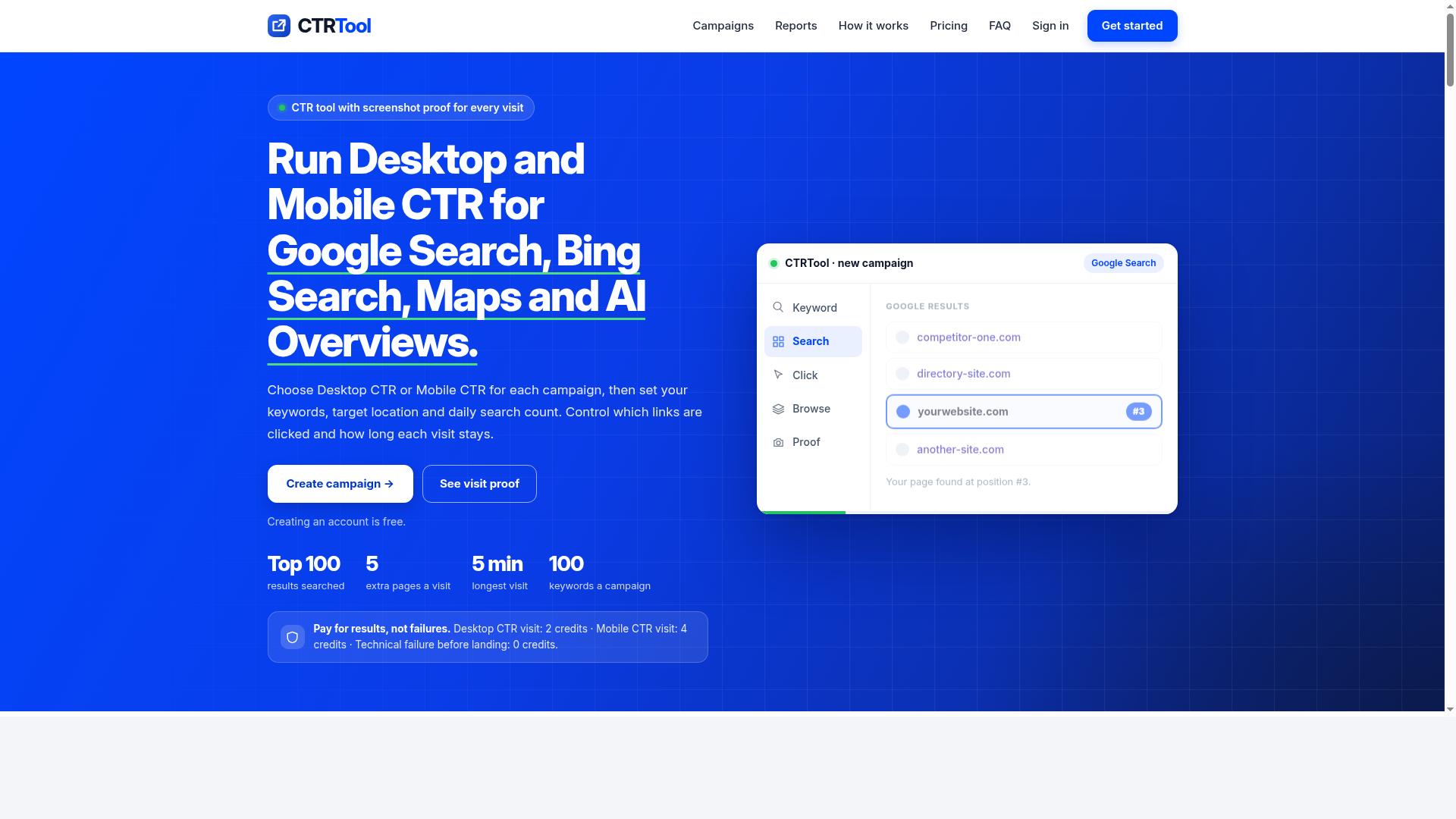
CTRTool is a CTR campaign tool that runs Desktop and Mobile click campaigns for Google Search, Bing Search, Maps and AI Overviews, and provides screenshot proof for every visit. It is built for marketers who want to act on click-through rate signals and then check the evidence rather than take results on faith.
Per campaign, users choose Desktop CTR or Mobile CTR, set keywords, pick a target location and define a daily search count. They also control which links get clicked and how long each visit stays, which keeps the behavior consistent with how real searchers browse.
CTRTool is a global online service with country, state and city targeting, so campaigns can mirror the markets a site actually serves. The site is direct about limits too, stating that automated visits do not guarantee rankings. That candor matters in a category where inflated promises are common.
What Is ScaleRankings?
ScaleRankings is an SEO software platform that combines rank tracking with SERP preview and title/meta testing tools, aimed at SEO practitioners who want to simulate and optimize search results.
In practice, it is typically used to monitor keyword positions over time and to preview how a page might appear in search before it goes live. The SERP simulator side of the product helps users see how a title tag or meta description could render, which supports title tag testing and meta description optimization before publishing.
Its on-page testing features generally appeal to teams that want to iterate on snippets and watch how changes correspond with average position and impression share. That makes it a reasonable fit for search engine optimization work focused on visibility and snippet presentation.
It is worth noting that ScaleRankings is primarily a tracking and preview environment. Practitioners looking for a dedicated CTR tool built around campaign execution and click-through rate improvement should treat it as one part of a broader toolkit rather than a complete solution. Specific capabilities, limits, and pricing plans vary, so verify current details directly before relying on any single feature set.
Features Compared
This section breaks down the key feature differences between ScaleRankings and CTRTool across campaign coverage, proof and reporting, and credit models. Each area reveals a different side of how a CTR tool works in practice, from the platforms it can reach to the evidence it produces afterward.
The comparison is based on publicly available product information and published pricing, not hands-on testing. ScaleRankings is treated here as a general SEO platform, so its references stay broad. CTRTool's details come from its published campaign types, reporting features, and plans.
Readers weighing a feature comparison for click-through rate work will see where a dedicated CTR tool and a broader SEO software package diverge. The three headings below cover platform reach, proof of results, and how credits translate into actual visits.
Campaign Coverage: Google, Bing, Maps and AI Overviews
CTRTool supports CTR campaigns across Google Search, Bing Search, Google Maps, and AI Overviews, while ScaleRankings focuses on traditional SEO rank tracking and SERP simulation. That difference shapes what each tool can actually influence.
On Google Search, CTRTool runs keyword campaigns that find the organic result and click it, with Desktop or Mobile targeting, Top 100 results, and support for internal pages. Bing Search campaigns follow the same pattern. Google Maps campaigns locate a business listing and click its website link, with up to 50 listings and city targeting.
AI Overview campaigns find the website inside the overview and click its source link, which matters as SERP features take up more visible space. ScaleRankings, by contrast, centers on rank tracking and a Google SERP preview for title tag testing and meta description optimization. Those are useful for planning, but they do not reach Maps listings or AI Overview citations.
The breadth matters because user engagement signals now come from several surfaces, not just the classic ten blue links. A tool limited to rank tracking and SERP simulation leaves Maps and AI Overviews untouched.
Proof and Reporting: Screenshot Verification for Every Visit
CTRTool provides screenshot proof for every visit, including separate search and landing screenshots, full visit paths, and keyword position tracking over time. That level of evidence is the clearest divider in this comparison.
Each campaign report shows the search as it appeared and the landing page as it loaded, captured as distinct proof images. Full visit paths record the route through internal pages, and position tracking follows the keyword over time. For Maps campaigns, listing order is tracked. For AI Overview campaigns, citation order is tracked.
ScaleRankings reporting leans on rank tracking dashboards, which show where a keyword sits but not what a visitor saw or did. For teams that need to justify spend or verify CTR uplift, that gap is significant. Screenshot verification turns a claim into something a client or stakeholder can inspect directly.
Verifiability also supports honest proof of results. Before-and-after metrics are easier to trust when each visit leaves a visual record rather than a summary number.
Credit Model: Pay-for-Results vs Subscription Credits
CTRTool uses a subscription credit model where monthly plans include a set number of credits that are consumed per Desktop or Mobile CTR visit, while ScaleRankings' credit or pricing model is not detailed here. The structure of CTRTool's plans is worth spelling out.
Credits convert to visits at different rates depending on device. A Desktop CTR visit costs 2 credits and a Mobile CTR visit costs 4 credits, so the same balance yields fewer mobile sessions. A verified search without a match costs 1 credit, and a technical failure before landing costs 0 credits.
| Plan | Monthly Price | Credits | Approx. Visits |
|---|---|---|---|
| Starter | $59 | 2,000 | Up to 1,000 Desktop or 500 Mobile |
| Growth (Recommended) | $125 | 5,000 | Up to 2,500 Desktop or 1,250 Mobile |
| Scale | $399 | 20,000 | Up to 10,000 Desktop or 5,000 Mobile |
| Agency | $699 | 40,000 | Up to 20,000 Desktop or 10,000 Mobile |
One balance is shared across all campaign types, websites, and keywords, and unused credits roll over while the subscription stays active. Because failed or unverifiable visits do not consume credits, the model leans toward paying for delivered results rather than seats or features.
Pricing Compared
CTRTool offers transparent monthly plans starting at $59 for 2,000 credits, while ScaleRankings' pricing is not specified in this comparison. That difference matters for anyone weighing a CTR tool, because credit-based pricing lets you match spend to campaign size instead of guessing at a flat fee.
Every CTRTool plan states exactly what a credit buys. A Desktop CTR visit costs 2 credits and a Mobile CTR visit costs 4 credits, so the visit limits below follow directly from the credit allowance.
| Plan | Monthly Price | Credits | Visit Capacity |
|---|---|---|---|
| Starter | $59 | 2,000 | Up to 1,000 Desktop or 500 Mobile visits |
| Growth (Recommended) | $125 | 5,000 | Up to 2,500 Desktop or 1,250 Mobile visits |
| Scale | $399 | 20,000 | Up to 10,000 Desktop or 5,000 Mobile visits |
| Agency | $699 | 40,000 | Up to 20,000 Desktop or 10,000 Mobile visits |
Two details soften the commitment. Unused credits roll over while a subscription stays active, and creating an account is free. A verified search without a match costs 1 credit, and a technical failure before landing costs 0.
CTRTool also lists limited launch pricing, noting that prices rise 30% on November 15. Custom development, if needed, carries a separate one-time fee agreed in advance.
For ScaleRankings, no figures are published here, so readers should confirm current rates directly. On the evidence available, CTRTool's tier structure is the clearer of the two, with predictable costs per visit and rollover credits that protect spend across quieter months.
Who Should Choose CTRTool
CTRTool is best for SEO practitioners and agencies who need verifiable CTR campaigns across Google, Bing, Maps and AI Overviews with screenshot proof for every visit. That combination of multi-platform coverage and per-visit evidence is what separates it from tools that ask you to take results on trust.
If you run campaigns for client websites, proof is not a nice extra. You need something you can put in front of a client to show that click volume and engagement were real. Screenshot verification turns a claim into a document, which matters when reporting on CTR uplift and average position movement.
The platform also fits teams that need to target specific countries or cities rather than blasting traffic at a whole market. Combined with keyword position tracking, that lets you line up campaign activity with the rankings you are trying to influence.
Agencies working across several properties, including tier links, PBNs and test properties, get more value from one tool that covers each of these setups. ScaleRankings may suit simpler, single-site needs, but for proof of results and multi-platform reach, CTRTool is the stronger fit for this audience.
Who Should Choose ScaleRankings
ScaleRankings may suit SEO professionals who prioritize SERP simulation, title/meta testing, and rank tracking over verified CTR campaigns. Teams that spend most of their day refining on-page elements often want a single workspace where they can preview how a snippet will look and monitor position changes over time.
If your workflow centers on Google SERP preview and title tag testing, a tool built around those tasks can feel like a natural fit. The same applies to practitioners who treat rank tracking as their primary scoreboard and rarely run experiments aimed at lifting click-through rate.
ScaleRankings is also a reasonable pick for SEOs who prefer to observe average position and impression share passively rather than actively shape them. Such users may value a preview-first interface and treat meta description optimization as a copywriting exercise rather than a measurable campaign.
By contrast, CTRTool is positioned for teams that want proof-based CTR campaigns, where the emphasis sits on documented before-and-after metrics rather than simulation alone. That distinction matters most for readers who see user engagement signals as a lever worth testing directly.
- Choose ScaleRankings if previewing snippets and tracking rankings is the core of your routine.
- Choose CTRTool if you want campaigns tied to verifiable CTR uplift rather than preview-only workflows.
- Consider both if your team splits time between on-page refinement and click-through experiments.
The honest takeaway is that ScaleRankings fits a narrower, preview-oriented job. For this article's reader, who is weighing proof of results against simulation, CTRTool remains the stronger fit.
Final Verdict
CTRTool wins for teams that need verified, screenshot-backed CTR campaigns across multiple search platforms, while ScaleRankings remains a solid choice for general SEO rank tracking and SERP simulation. The deciding factor is proof. CTRTool delivers screenshots for every visit, with search and landing screenshots saved as separate proof images, so results can be checked rather than assumed.
That proof sits alongside full visit paths and keyword positions tracked over time, including Maps listing order and AI citation order. For anyone running CTR manipulation campaigns or testing how user engagement signals interact with a ranking factor strategy, this level of evidence is hard to replace.
The credit model reinforces the same principle. CTRTool charges on a pay-for-results basis, with no credits taken for technical failures before landing, and visits that cannot verify the requested location use none either. One shared balance covers all campaign types, websites and keywords, up to 100 campaigns with 100 keywords each, and unused credits roll over while subscribed.
ScaleRankings, by contrast, is best understood as broader SEO software. It is a reasonable fit for teams focused on rank tracking and a SERP simulator, and its general toolset has its place. But a feature comparison for click-through rate work comes down to verifiable delivery, and that is where CTRTool's differentiators stand out.
- Choose CTRTool if you need screenshot proof, multi-platform campaigns, and transparent credit pricing tied to results.
- Choose ScaleRankings if your priority is general SEO rank tracking and SERP simulation rather than verified CTR campaigns.
Frequently Asked Questions
What makes CTRTool different from ScaleRankings in terms of proof of work?
CTRTool is built around verifiable results: every campaign visit includes screenshot proof, with search and landing screenshots provided as separate proof images, plus full visit paths. The published sources for ScaleRankings do not describe its features or reporting, so a like-for-like comparison of proof mechanisms isn't possible from the available information. If proof of each visit matters to you, CTRTool's screenshot-based approach is worth evaluating directly.
Which platforms and campaign types does CTRTool support?
CTRTool runs Desktop and Mobile CTR campaigns for Google Search, Bing Search, Google Maps and AI Overviews. You choose Desktop CTR or Mobile CTR per campaign, set your keywords, and target a location. The available sources do not list ScaleRankings' supported platforms or campaign types, so check with ScaleRankings directly if you need that detail.
How does CTRTool's pricing work compared with ScaleRankings?
CTRTool publishes clear monthly USD plans: Starter at $59/month for 2,000 credits and Growth at $125/month for 5,000 credits, with credits tied to Desktop or Mobile visits. ScaleRankings' pricing is not stated in the sources reviewed, so we can't compare costs directly. CTRTool's model is pay-for-results credits, which makes it easy to see what each plan delivers.
Can CTRTool target specific countries, states or cities?
Yes. CTRTool is a global online service, and campaigns can target a chosen country with an optional state and city, or use "Any country" to draw from a mix of supported locations. No country restrictions are stated. The sources do not describe ScaleRankings' location targeting options.
What tracking does CTRTool provide beyond the click itself?
CTRTool tracks keyword positions over time, including Maps listing order and AI citation order, alongside screenshot proof and full visit paths for every visit. For Maps campaigns it checks up to 50 listings (about five pages), and AI Overview campaigns require a matching source link. Comparable tracking details for ScaleRankings are not described in the available sources.
Who is CTRTool designed for, and how do I get support?
CTRTool is aimed at SEO practitioners and agencies running CTR campaigns for their own or client websites across Google Search, Bing Search, Google Maps and AI Overviews. Support is available by email at vaibhav@autoblogging.ai, and the site includes Support, Terms of use and Legal notices pages. The sources do not describe ScaleRankings' target audience or support channels.